There is no Create button
Your plan, role, or workspace policy does not currently permit a full custom MCP app. RingMyHuman cannot fix that from its own dashboard; connect with Codex or Claude instead.
RingMyHuman uses MCP actions that can create or manage Ringflows and request real calls. ChatGPT must allow full custom MCP apps for those actions to work.
A workspace owner or administrator must allow developer mode and custom MCP connectors. In ChatGPT, open Settings, then Security and login, and confirm Developer mode is available for your account.
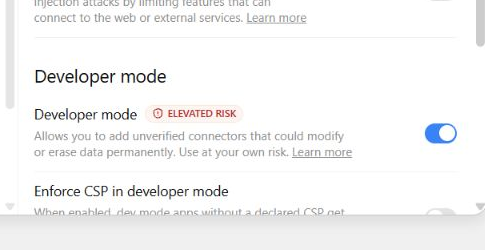
Open Workspace settings, choose Apps, and select Create. Depending on the current interface and your plan, this area may be labeled Plugins or custom MCP connectors.
Enter the hosted endpoint, choose OAuth when prompted, and select Scan tools. Complete the RingMyHuman browser authorization, then wait for the tool scan to finish.
Name: RingMyHuman
MCP server URL: https://mcp.ringmyhuman.com/mcp
Authentication: OAuthReview the discovered actions, create the app, and enable the draft for your own tests. Only an authorized workspace owner or administrator can publish it for other members.
Select RingMyHuman from the tools or plugins menu. Ask it to list Ringflows first, then make one controlled request with a clearly named Ringflow. Review action confirmations carefully.
Confirm the intended Ringflow, recipients, and limits first. Then make one controlled request and poll its request ID until the result is final.
Use RingMyHuman to list my active Ringflows. Do not place a call.
Using my General decisions Ringflow, ask whether I want this task to continue or pause. Return the request ID and wait for a terminal result without placing a duplicate call.
Your plan, role, or workspace policy does not currently permit a full custom MCP app. RingMyHuman cannot fix that from its own dashboard; connect with Codex or Claude instead.
Your ChatGPT plan may not allow full MCP actions. RingMyHuman requires action support to create Ringflows or request calls.
Reconnect the app so ChatGPT can obtain a fresh authorization. Do not paste a RingMyHuman access token into a conversation.